

Sanne van Opstal-Brakel
Employee
Employee
March 31, 2026

Say hello to the new Self-Service Portal
Related products:Self-Service Portal
  • March 31, 2026
  • 60 replies
  • 2129 views

Update: June 15th 2026

Say hello to the new Self-Service Portal

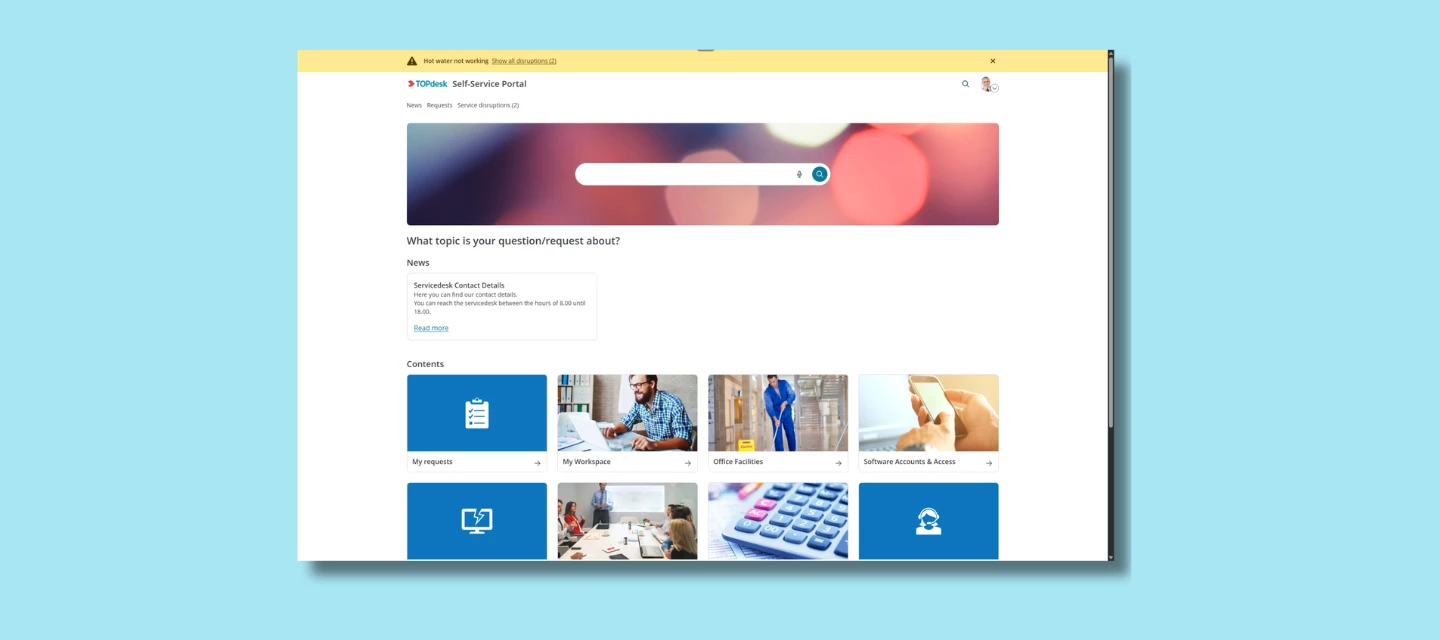
We’re excited to share that the new Self-Service Portal (new SSP) is now available for all application managers. After months of development, testing, and gathering feedback, the new SSP is ready for you to explore and ready for your employees whenever you decide to switch it on.

The new SSP was built with one clear goal: make it easier for employees to quickly find what they need.
 

What the new SSP is

The Self-Service Portal should be the first place that employees go when something’s wrong or when they need to request something. And with today’s expectations for modern tools, the classic SSP no longer matched how users prefer to work.

That’s why we rebuilt it from the ground up.

The new SSP brings:

  • A cleaner, modern design

The interface feels lighter, clearer, and more intuitive even for users who rarely open the portal.

  • Improved navigation

Instead of searching through tiles or guessing where to click, users follow a clearer, more structured flow. It’s easier to discover services, forms, and knowledge items without digging.

  • A more user-friendly experience

The layout helps users focus on what matters: describing their needs and getting an answer. The new structure works better on all devices, supports accessibility improvements, and feels more like the tools people use in their day-to-day life.

  • A foundation for new capabilities

Some of our upcoming AI capabilities — like AI Search — are designed to work specifically with the new SSP layout and architecture. Switching to the new SSP means you're ready for what’s coming next.


You decide when to make it available to your users

From today onward, application managers can enable the new SSP whenever it suits their organization.

The new SSP is optional at launch. You can test it quietly with a small group, and open it up for everyone when you're ready.

When you enable it as your default SSP, all classic SSP links automatically redirect, including links inside email templates. No manual updates are needed.


A smooth transition

Not all SSP components have been fully redesigned yet. That means some pages will still be redirected to the classic Self-Service Portal. This is intentional and important:

  • Users never hit a dead end
  • All workflows stay functional
  • You can adopt the new SSP gradually, without risk

We’ll keep releasing improvements from now on until the entire flow is ready to stand on its own.


How to get started

You can enable the new SSP right now. Documentation and setup guidance will continue to expand over the coming updates.


What do you think?

Have you already enabled the new SSP in your environment? How are your users responding to the refreshed design and improved navigation? Share your experiences below!


FAQ

As we see a lot of similar questions about the new SSP we try to answer them all at the same time in this FAQ. 

Am I forced to switch?
No. Switching is optional, your current setup stays in place, and you can move back to the old portal at any time.
​​​​​​

What happens to my existing links when I switch?
When you enable the new SSP as your default, all classic SSP links redirect automatically, including links in email templates. No manual updates needed.
Note: some pages (such as reservations management) will still temporarily redirect to the classic SSP while the migration is in progress. Users will never hit a dead end.

What do I actually gain right now?
For your end users: a faster, clearer portal prominent search, quick links up top, and a clearer services overview. From the Engaged package onwards, this also unlocks access to AI Search.
 

Why is customization more limited, and how do I handle images in the new SSP?
We chose to release the new SSP early and in parts so you get new features sooner. The SSP Designer still runs on the older version, so options for adjusting layout, tile sizes, and branding are more limited today expanding it is something we're working on.

In the meantime, images behave differently in the new SSP: they're responsive and cropped rather than scaled, so images from your old setup may not transfer cleanly. The recommended sizes are 300×200 or 200×200 px for tiles and 2784×480 px for banners (keep essential content centered, as edges may crop on smaller screens). Knowledge item KI 19224 has the full details.

Before switching, we recommend reviewing the Update Guide — it helps you assess whether the new SSP already fits your organization's needs.

Does my feedback go anywhere?
Yes, it's directly setting the order of what we build next. Submit via the feedback button inside the new SSP, or via TIP.


60 replies

Simon Rupp
Employee
Employee
April 17, 2026

Thank you for sharing all your feedback and reactions. We understand that the new SSP does not yet meet every expectation, and we take that seriously.

That said, the decision to release at this stage was a deliberate one - we wanted to give customers whose expectations the new SSP already fully meets the opportunity to start using it as soon as possible, rather than making everyone wait until everything is fully complete. Alongside the release, we published an Update Guide to help you make an informed decision about whether the new SSP is ready to set as the default for your organization.

We understand that styling and the ability to shape the look and feel of the new SSP matters a great deal. All of this feedback will be taken into account when we turn our attention to the SSP Designer. Every piece of feedback submitted via tip.topdesk.com or the feedback forms within the product directly influences the priority of items on our roadmap - so please keep it coming.

And also, if you feel that something isn't working as it should, please don't hesitate to contact our support.

Currently, we are focused on finishing up the AI Search, fully equipping the approval interfaces with new UIs and bringing the Share & Subscribe feature to forms in the new SSP.

And as always, you can keep up to date on our future plans via our roadmap at tip.topdesk.com.

Patrick van Hoof
Starter ⭐⭐⭐
April 22, 2026

Is het ook mogelijk in het nieuwe SSP om onderin de link “Diensten” te verbergen? Verder zijn wij ook afwachtend op de nieuwe designer :)

NickB
Explorer ⭐⭐⭐⭐⭐
April 22, 2026

@Patrick van Hoof  - why do you want to hide it?
we’d prefer it more pronounced and explained that it's an A-Z of Services as it currently doesn't lead you in to want to click it because you don't know what it does or is; equally we’d like the footer pinned so its always present

All Round IT Nice Guy (most of the time)
New Member ⭐
May 11, 2026

Hoi,

Ik zie dat je bij eigen geuploade icoontjes op een subpage, een randje van de achtergrond kleur terug ziet komen.
Enig idee of hier een oplossing voor is? Is geen urgente zaak, maar misschien wel iets om naar te kijken.

Alvast bedankt!


Inspirer
May 11, 2026

Is het ook mogelijk in het nieuwe SSP om onderin de link “Diensten” te verbergen? Verder zijn wij ook afwachtend op de nieuwe designer :)

Wij ook. Het is ook echt een random plek. Had het dan in de topnav toegevoegd. Maar inderdaad, wel optioneel! 

Rico Roodenburg - Sharing is caring 🤝
Marianne Schulte
New Member ⭐⭐⭐
May 20, 2026

We have just switched to the new SSP in our test environment. The first thing I noticed is that the images no longer fit properly within the tiles.


And on a subpage, the text blocks and tile blocks no longer align.


And the shortcut tile no longer opens in a new browser tab, even though this is configured that way in the designer.


I agree - do not like this. 

Anneke Ligthart
Explorer ⭐⭐⭐
May 26, 2026

Hoi ​@Sanne van Opstal-Brakel  Ondanks dat de taal op deze site op Nederlands staat zie ik deze topic geheel in het Engels. Hoe kan ik dit aanpassen? Alvast bedankt! groet Anneke

Sanne van Opstal-Brakel
Employee
Employee
May 26, 2026

@Anneke Ligthart de Community is momenteel meertalig, Nederlands en Engels, maar helaas geldt dat niet voor álles. Bijvoorbeeld de product updates die kunnen we slechts in 1 taal publiceren en om deze content voor iedereen toegankelijk te maken staat dit er dus alleen in het Engels. 

Sanne van Opstal-Brakel, your TOPdesk Community Fairy Godmother
Marcel_B
New Member ⭐⭐
May 28, 2026

Helaas vind ik het geen verbetering in z'n totaal:

Op een standaard laptopscherm met een resolutie van 1920 x 1200 zie ik slechts 1 rijtje tegels op de hoofdpagina. Op een 4K scherm met een resolutie van 3840 x 2160 zie ik dan wel 3 rijen tegels maar zie ik weer aan beide zijkanten 20% witruimte (daarmee is 40% van mijn scherm leeg).  Hebben de ontwerpers het effect in beide situaties bekeken? 

Zoals hierboven al gemeld volstaan de plaatjes uit de huidige versie niet meer. Daarmee moet ik al mijn plaatjes aanpassen/vernieuwen/bijsnijden?

Ook ik vind de weergave van ons bedrijfslogo te klein.

Het zoekvenster beslaat circa 1/3 van het scherm.  Het zoekvenster zou van mij wel helemaal weg mogen en de optie zoeken zou prima in de tekstkeuze balk boven aan kunnen. Dat levert een 2e rij tegels op. 

Heb ik de mogelijkheid om mijn huidige versie te publiceren terwijl ik een nieuwe versie ontwerp in mijn productieversie? Want van test naar productie overzetten kan niet (toch?) 

De menubalk bovenaan is ook geen verbetering:  het woord ‘aanvragen’ slaat de plank mis. Ik zou daar liever lezen:  Mijn verzoeken. Kun je zelf de tekst van deze woorden aanpassen? Kun je ook keuzes weglaten, want wij werken niet met goedkeuringen.

Daarnaast moet je nu moeite doe om verstoringen aan te klikken.  Ik vond het juist zo mooi dat je bij het openen van de SSP direct de headlines kon lezen van nieuws en storingen.


Unfortunately, I do not consider it an overall improvement:

On a standard laptop screen with a resolution of 1920 x 1200, I see only 1 row of tiles on the main page. On a 4K screen with a resolution of 3840 x 2160, I do see 3 rows of tiles, but I see 20% white space on both sides (meaning 40% of my screen is empty). Have the designers examined the effect in both situations?

As mentioned above, the images from the current version are no longer sufficient. Does this mean I have to adjust/refresh/crop all my images?

I also think the display of our company logo is too small.

The search window takes up approximately 1/3 of the screen. I would prefer the search window to be removed entirely, and the search option could easily be placed in the text selection bar at the top. That would result in a 2nd row of tiles.

Do I have the option to publish my current version while I design a new version in my production version? Because transferring from test to production isn't possible (right?)

The menu bar at the top isn't an improvement either: the word ‘requests’ misses the mark. I would prefer to read: My requests. Can you adjust the text of these words yourself? Can you also omit choices, because we don't work with approvals.

Additionally, you now have to go to the trouble of clicking on outages. I actually thought it was so nice that you could read the headlines of news and outages immediately upon opening the SSP.

Joost Oostindie
Contributor
May 28, 2026

Voor iedereen die problemen heeft met wazige afbeeldingen op de tegels, of de juiste grootte ingesteld krijgen heeft TOPdesk een kennis item beschikbaar gemaakt met tips en tricks die je kan gebruiken om dit te verhelpen:

KI 19224 - Adjusting tile images for the new SSP

Kort samengevat komt het er op neer dat je de afbeeldingen die je upload het formaat 300x200 of 200x200 pixels moet geven, niet groter.

----------------------------------------------------------------------------------------

For anyone experiencing issues with blurry images on the tiles or having trouble setting the correct size, TOPdesk has published a knowledge base article with tips and tricks to help resolve these issues:

KI 19224 - Adjusting tile images for the new SSP

In short, this means that the images you upload must be 300x200 or 200x200 pixels in size, no larger.

Joost mag het weten, jij ook!