

Customer Satisfaction Dashboard Now Available in the TOPdesk Reporting Hub
Related products:Dashboarding & Reporting
  • February 11, 2026
  • 10 replies
  • 176 views
Péter Pölöskei
Employee

Customer satisfaction is one of the most important indicators of success in IT Service Management. With that in mind, we’re excited to introduce a new addition to the TOPdesk Reporting Hub: the Customer Satisfaction (CSAT) Dashboard.

This dashboard brings your existing star‑rating data to life. It gives you a clear overview of how end users experience your services, helping you understand what’s going well and where improvements will have the most impact.
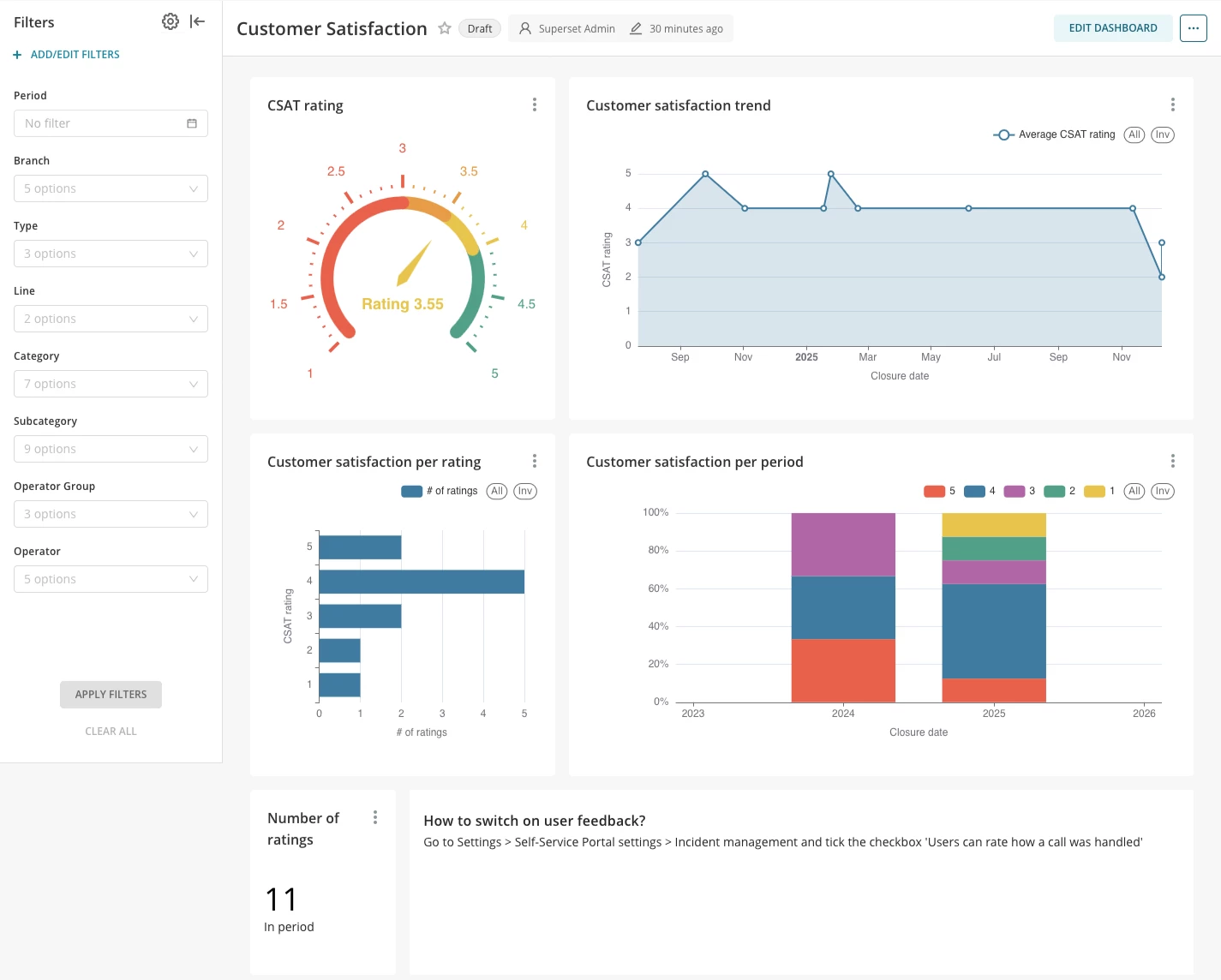
 

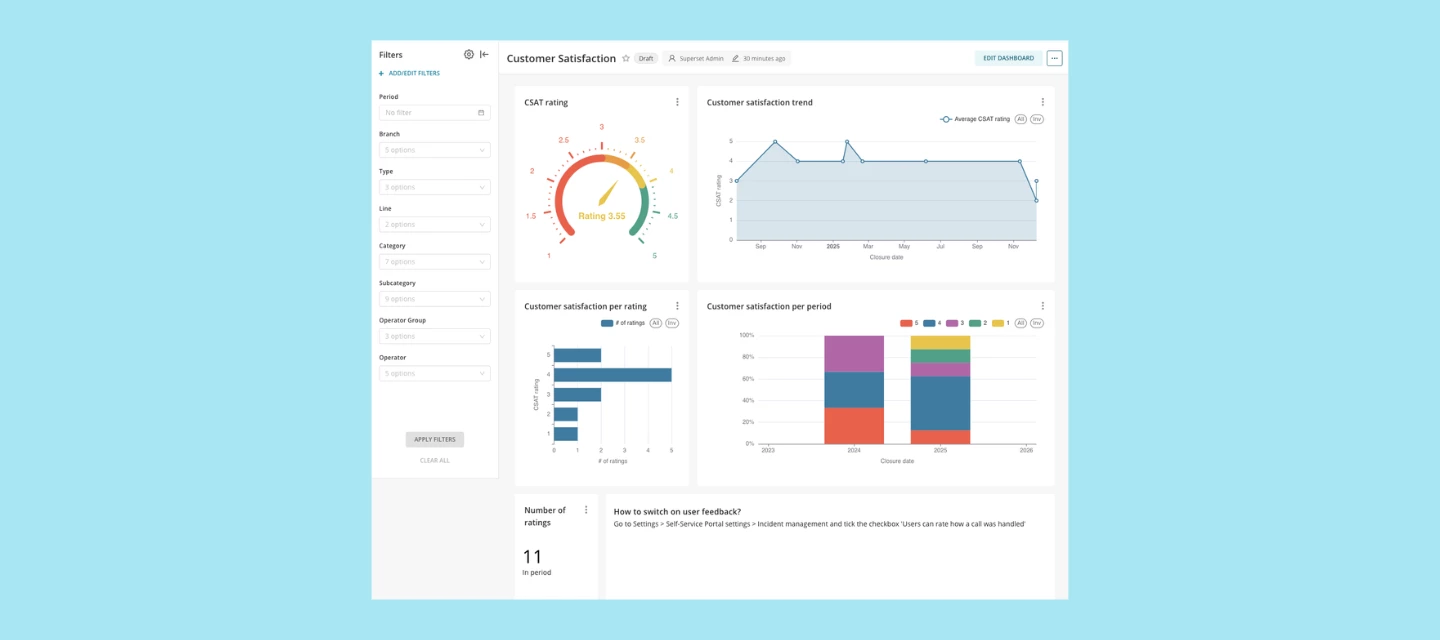
CSAT Dashboard


What you’ll find in the CSAT Dashboard

The CSAT Dashboard is designed to give you meaningful insights right away. Once opened, you’ll see:

  • Overall satisfaction score
    A straightforward view of your average star rating for the period you select. It helps you quickly determine whether your service is meeting expectations.
     
  • Rating distribution
    A breakdown of how many 1‑ to 5‑star ratings you’ve received. This makes it easy to understand whether feedback skews mostly positive, or if there are specific points that need attention.
     
  • Satisfaction trends over time
    Charts that show how customer sentiment develops across weeks or months. This is ideal for evaluating the effect of process changes, staffing shifts, or seasonal peaks.
     
  • Insights per team, category or service area
    Use filters to zoom in on the parts of your service delivery that matter most to your organization. Whether you want to focus on one team or a specific ticket type, the dashboard helps you get to the details.
     

Ready to use from the moment you open it

Just like the other dashboards in the Reporting Hub, the CSAT Dashboard works out of the box. Once star ratings are enabled in your environment, the dashboard automatically starts presenting your data in a clear, visual way. And with filtering options, you can adapt the view to your needs without any complex setup.

Why it helps

The CSAT Dashboard supports your continuous improvement efforts by showing:

  • Whether your services are meeting customer expectations
  • The value your teams deliver across the organization

It gives you the insights you need to make confident, data‑driven decisions.

Start exploring today

The CSAT Dashboard is now available in the TOPdesk Reporting Hub.

If you’re already collecting star ratings, your insights are ready for you to explore.
If not:

Tip:
You can turn on star ratings in your settings. It only takes a moment and gives your end users a simple way to share feedback. Once enabled, the CSAT Dashboard will automatically visualize their responses and help you start collecting valuable insights right away.

If you have feedback or suggestions for the CSAT Dashboard, you can share them directly with us through TIP.


10 replies

NickB
Forum|alt.badge.img+2
  • New Member
  • February 11, 2026

Im loving the visuals and my team seem to like them too with an avg 4.7 out of 5 stars since day 0


Christiaan Fousert
Forum|alt.badge.img+5

Because the 1 till 5 stars is to less information for us we switched this functionality off. When the customer gave stars it was only 1 for not satisfied of 5 for very satisfied. Only 1 on a 1000 incidents got stars.


Sanne van Opstal-Brakel
Community Manager
Forum|alt.badge.img+11

Do you use different tooling to measure your customer satisfaction ​@Christiaan Fousert ? 


NickB
Forum|alt.badge.img+2
  • New Member
  • February 11, 2026

Because the 1 till 5 stars is to less information for us we switched this functionality off. When the customer gave stars it was only 1 for not satisfied of 5 for very satisfied. Only 1 on a 1000 incidents got stars.

we had the same concern initially with the lack of contextual information but we amended closure emails to provide either a 5 star only OR feedback via another link back to the ssp where they could leave a 5 star review and leave a personalised comment for feedback.

proportionally we get more without than with but we took the view that feedback is feedback.
if 1 or 2 stars are supplied as part of that feedback it flags for review by the manager - some of it is highly questionable or expectations way beyond even blue chip companies but other times its proved valuable to correct misunderstandings or correct language used on closure call notes.

it was easily 200%+ more responses in feedback with it on for us! :-)
would love for it to appear on other areas such as changes/orders etc.


Robin Noppert
Forum|alt.badge.img+11

Because the 1 till 5 stars is to less information for us we switched this functionality off. When the customer gave stars it was only 1 for not satisfied of 5 for very satisfied. Only 1 on a 1000 incidents got stars.

We have the same, Also we noticed, people answered based on whether on if their problem got solved not based on the service the helpdesk gives, even though they tried to help them several days in row. 

Plus… I feel people give a review faster when they are not satisfied then when they are helped


Robin Noppert
Forum|alt.badge.img+11

But besides that, I love how the look and feel is!! It really is great and I love to have my reports within the application its based on


Christiaan Fousert
Forum|alt.badge.img+5

But besides that, I love how the look and feel is!! It really is great and I love to have my reports within the application its based on

True, it looks great. 
I'm gonna try the tip that ​@NickB gave. 

And to answer ​@Sanne van Opstal-Brakel we don't use any tooling at this time.


NickB
Forum|alt.badge.img+2
  • New Member
  • February 12, 2026

But besides that, I love how the look and feel is!! It really is great and I love to have my reports within the application its based on

True, it looks great. 
I'm gonna try the tip that ​@NickB gave. 

And to answer ​@Sanne van Opstal-Brakel we don't use any tooling at this time.

pending what modules you have survey could be another route for you to obtain feedback

https://docs.topdesk.com/en/survey-management.html


Forum|alt.badge.img
  • New Member
  • March 9, 2026

.


Forum|alt.badge.img
  • New Member
  • March 9, 2026

I miss that you can't click on the rating and see the real response. I see how many times a rating is given, but now I want to see why to I can see if we can improve something.