

AI Answer Assistant: the right answer, every time
Related products:Incident ManagementKnowledge BaseAI
  • June 30, 2026
  • 4 replies
  • 91 views
Sanne van Opstal-Brakel
Employee
Forum|alt.badge.img+15

AI Answer Assistant is now available. It brings your knowledge base into every ticket automatically, so your team stops writing the same answers from scratch, and every operator gives the response your team has already perfected.

The problem it solves

Your knowledge base has great answers in it. But actually, using them takes opening a separate tab, searching for the right knowledge item, hoping it comes up, reading through it, and rewriting it into a reply. By the time you've done all that, the next ticket has already come in.


New operators struggle most, they often don't know what's in the knowledge base yet, and when search fails them, they turn to Copilot or ChatGPT instead. The result: inconsistent answers, depending entirely on who picks up the ticket.

What AI Answer Assistant does

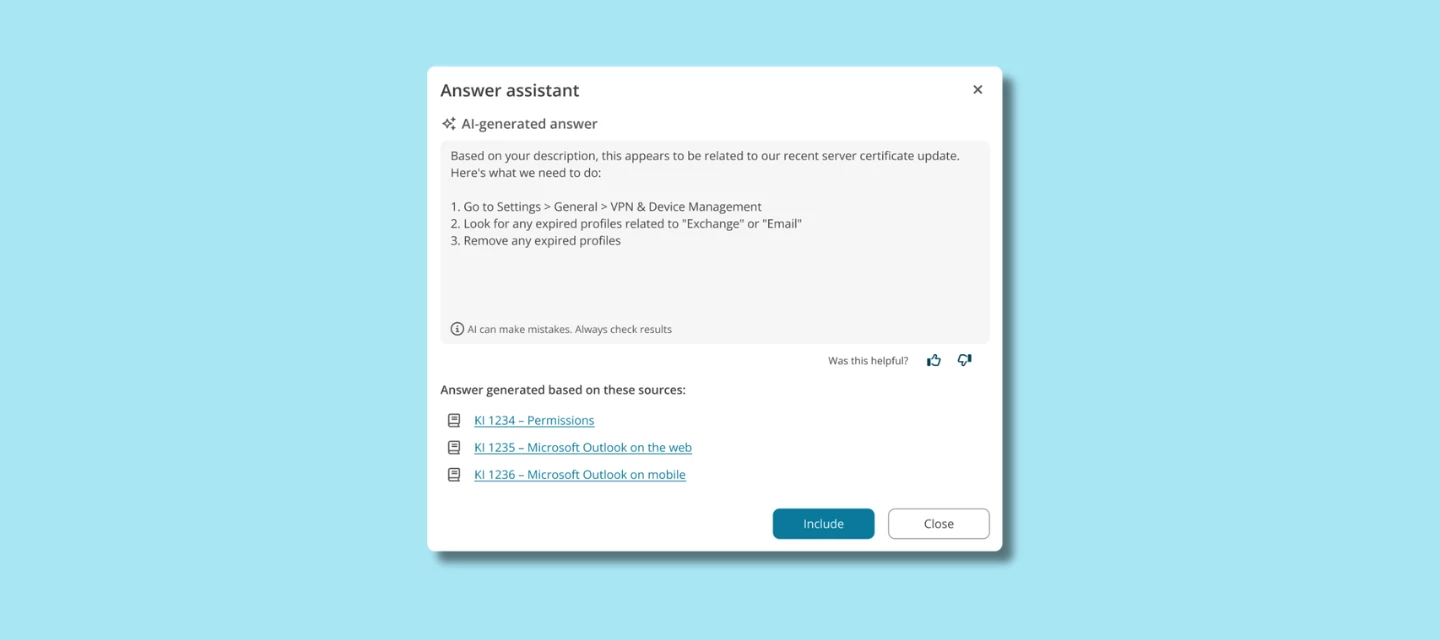
A new ‘Respond’ button appears in the incident card. Click it, and AI pulls a ready-to-use draft from the matching knowledge item in your knowledge base right there in the card.

Operators stay in control: the answer is a suggestion, not an automatic send. Review it, adjust it, and send when you're ready.


A note on your knowledge base

AI Answer Assistant is only as good as the knowledge behind it. If your knowledge base is thin or out of date, the suggestions will be too. The better the foundation, the better the answers.

If your knowledge base could use some work first, we've also just released the new Knowledge Base Explorer which makes organizing your knowledge a lot easier.


How to get started

Available in July on the Excellent plan. The button appears in the incident card, no additional configuration needed. Read more about the AI set up here


What do you think?

Have you been relying on your knowledge base for ticket responses, or has it been gathering dust? We're curious how your team handles this today and whether Answer Assistant changes that. Drop your questions or experiences below.

4 replies

NickB
Forum|alt.badge.img+4
  • Explorer ⭐⭐
  • June 30, 2026

From the video i shows the Knowledge Item being referenced but didn't show when saved that the knowledge item was linked to the ticket in terms of its use.

is that right? if so, it suggests I lose the metric where I can see where Knowledge Items are linked to calls as part of their resolution or is this stored somewhere else now?

thanks in advance :-)


Forum|alt.badge.img+1
  • New Member ⭐⭐⭐⭐
  • June 30, 2026

Will this feature become available in the Change Management Module as well?

We use Change Management for our Service Requests (Simple Changes) and there is no link to the Knowledge base at present which is very frustrating when we are trying to use standard responses to end users.

At present we have to open an incident ticket to access the Knowledge Based widget, and then copy and paste into the Simple change.


Forum|alt.badge.img

From the video i shows the Knowledge Item being referenced but didn't show when saved that the knowledge item was linked to the ticket in terms of its use.

is that right? if so, it suggests I lose the metric where I can see where Knowledge Items are linked to calls as part of their resolution or is this stored somewhere else now?

thanks in advance :-)

Hi Nick, 
You're right that the video doesn't show an explicit "linked Knowledge Item" confirmation step when saving the reply. Here's how it works under the hood right now: when the AI generates an answer, the source Knowledge Item link is included as a clickable link in the generated text. If an operator includes the answer content, the KI is not included.  
We hear the underlying ask: you want to keep using "KI linked to call" as a resolution metric, and Answer Assistant shouldn't break that. We're noting this as feedback for how we handle reporting on AI-assisted answers going forward.

Cheers, 

Anna Nemirova, AI PM


Forum|alt.badge.img

Will this feature become available in the Change Management Module as well?

We use Change Management for our Service Requests (Simple Changes) and there is no link to the Knowledge base at present which is very frustrating when we are trying to use standard responses to end users.

At present we have to open an incident ticket to access the Knowledge Based widget, and then copy and paste into the Simple change.

Hi Caroline, 

Thanks for flagging this, and that workaround you're describing (opening an incident just to reach the Knowledge Base widget, then copy-pasting into the Simple Change) is exactly the kind of friction we want to reduce, so this is genuinely useful feedback.
Right now, AI Answer Assistant is scoped to the incident card only. I can't make any commitments about Change Management support at this stage; it's not something I can confirm one way or the other for the roadmap today. What I can do is make sure this use case (standard responses to end users in Simple Changes) is logged as feedback for our team.
In the meantime, your current workaround via the incident Knowledge Base widget is the supported path. If you want, you're welcome to also submit this as a formal idea/request through https://tip.topdesk.com/ so it's tracked and other customers with the same need can upvote it too.


Cheers, 

Anna Nemirova, AI PM