Explorer ⭐
September 14, 2026
Solved

Dubbele items en fout opgetreden bij aanpassen Self Service Portaal

  • September 14, 2026
  • 6 replies
  • 89 views

Ha community,

Ik krijg de laatste tijd vaak deze bug:

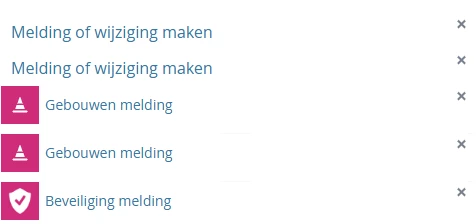
Als ik in het Self Service Portaal een subpagina aanpas, krijg ik regelmatig opeens dubbele items te zien en ‘fout opgetreden’.

Ik heb hier zojuist een support ticket van aangemaakt, maar ik was benieuwd of jullie er ook last van hebben, want dan weet ik of het aan mij ligt of aan het systeem.

Alvast bedankt!

Update: het probleem doet zich nu voor als ik een Flow toevoeg. Ik dacht dat het gebeurde wanneer ik een custom icon upload, maar dat is het dus niet.

Update 2: de exacte stappen:

  1. Ik ben in het behandelaarsgedeelte
  2. Ik ga naar Selfserviceportal-designer
  3. Ik zit op de startpagina
  4. Ik voeg een subpagina tegel toe
  5. Ik ga naar de subpagina
  6. Ik voeg een flow toe
  7. Ik sla op
  8. Alles gaat goed.
  9. Ik voeg een nieuwe flow toe
  10. De flow die als eerste toegevoegd was komt dubbel te staan onder elkaar.
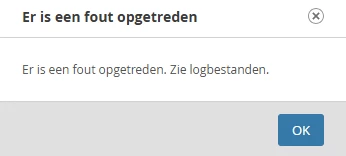
  11. Ik sla op, en ik krijg de foutmelding
 

Best answer by Ayman

Hi Frank,
you have to follow the support instructions as the community does not replace a professional support.

I believe, what you shared is a byproduct of the issue, not the issue itself, trying to pass duplicate description as you have shown earlier and the system does not know how to handle that so it throws an exception as warning (basically java is telling you I don’t know how to handle this exception)

I would suggest to follow the support instructions, in addition to basic troubleshooting: reboot your instance as it’s in test environement and try to recreate the subpage again.

If it doesn’t resolve the issue, review any previous customization that has been done and may affect the current situation and also review “errors” happening before/after the warning is thrown. 

6 replies

Starter ⭐⭐
September 14, 2026

Hi Frank,

I reproduced the same scenario, everything is good in my instance.


The error states to review the logs, did you have the chance to review it?

Explorer ⭐
September 14, 2026

Hi Ayman, thanks for reproducing!

TOPdesk Support checked the log of our test environment and they've found this:

WARN  Exception thrown
java.lang.IllegalArgumentException: Saving button descriptors is not allowed when collection contains a descriptor more than once
c1Z   Popup has been opened, caption value: Er is een fout opgetreden                                             | com.topdesk.tas.widget.popup.TopdeskPopupBuilder

They recommended to logout and login or try incognito mode. It's probably cache or cookie related.

AymanAnswer
Starter ⭐⭐
September 14, 2026

Hi Frank,
you have to follow the support instructions as the community does not replace a professional support.

I believe, what you shared is a byproduct of the issue, not the issue itself, trying to pass duplicate description as you have shown earlier and the system does not know how to handle that so it throws an exception as warning (basically java is telling you I don’t know how to handle this exception)

I would suggest to follow the support instructions, in addition to basic troubleshooting: reboot your instance as it’s in test environement and try to recreate the subpage again.

If it doesn’t resolve the issue, review any previous customization that has been done and may affect the current situation and also review “errors” happening before/after the warning is thrown. 

Explorer ⭐
September 15, 2026

Yes I will. It happens on both environments and it happens very often. That's why I was curious to know if more people had encountered this issue or not.

Starter ⭐⭐
September 15, 2026

Frank, try isolating the issue and review the logs around the timestamp, and increase the debug level if necessary.

Is it only happening when you select flows, or it’s the same issue with the other options?