

Sanne van Opstal-Brakel
Employee
Employee
December 11, 2025
News

New Self-Service Portal: join our open beta!
Related products:Self-Service Portal
  • December 11, 2025
  • 14 replies
  • 446 views

While updating many different pages on the Self-Service Portal (SSP), we’re working on improving the overall end-user experience. Because our goal is not only to improve the experience on various pages on your SSP, but also how users find their way through all these pages.

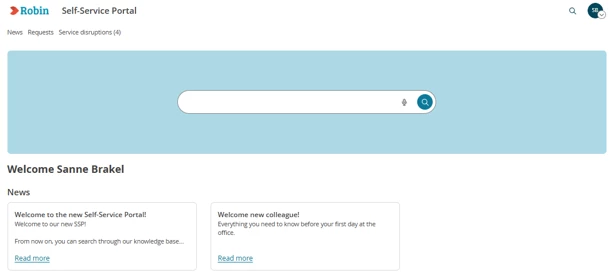
Rethinking the SSP involves many steps and changes. That’s why we launched an open beta for the new SSP. In this beta, you’ll experience the new direction of the SSP. For instance, you’ll find a new look for the startpage, a more unified look for the Incident and Change cards, a renewed Personal Profile page, and much more.

Curious about the future of the end user experience? Make sure you're not logged in to the Operator section, and simply add ‘/services/navigation-frontend/ssp/home’ behind your environment’s URL, e.g. ‘mycompany.topdesk.net/services/navigation-frontend/ssp/home’. And feel free to share this beta with your end users. Their feedback is invaluable for creating an end product that actually works for you.
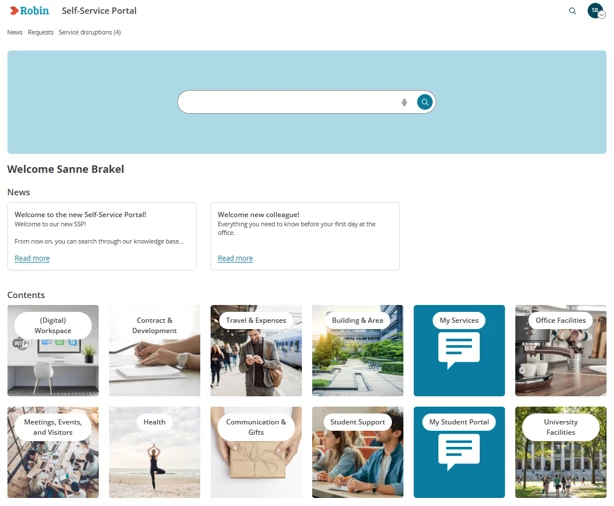
As it’s an early version, you’ll probably run into things that don’t work the way they should yet. Over the coming few months, we’ll continue fixing these.


For more information, and a place to leave feedback, see our TOPdesk innovation platform.

14 replies

Robin Noppert
Contributor
January 9, 2026

Will there soon be a new SSP editor as well, our Beta SSP does not look well, and I would like to shuffle it a bit around :D 

Groetjes en een fijne werkdag, Robin
Inspirer
January 9, 2026

Will there soon be a new SSP editor as well, our Beta SSP does not look well, and I would like to shuffle it a bit around :D 

I can ask for it next Tuesday to the PM of the new SSP.

Rico Roodenburg - Sharing is caring 🤝
Robin Noppert
Contributor
January 14, 2026

Will there soon be a new SSP editor as well, our Beta SSP does not look well, and I would like to shuffle it a bit around :D 

I can ask for it next Tuesday to the PM of the new SSP.

Hi Rico,

Did you get to ask for it? 

Groetjes en een fijne werkdag, Robin
Inspirer
January 14, 2026

Will there soon be a new SSP editor as well, our Beta SSP does not look well, and I would like to shuffle it a bit around :D 

I can ask for it next Tuesday to the PM of the new SSP.

Hi Rico,

Did you get to ask for it? 

I did indeed ask again yesterday. The focus is currently on the frontend. In the meantime, they’re still brainstorming about how they want to approach the designer. In other words: for the first launch, the old SSP designer will still be used, since the new frontend mainly relies on the current SSP backend (tiles, banner, colors etc).

Rico Roodenburg - Sharing is caring 🤝
Robin Noppert
Contributor
January 14, 2026

Will there soon be a new SSP editor as well, our Beta SSP does not look well, and I would like to shuffle it a bit around :D 

I can ask for it next Tuesday to the PM of the new SSP.

Hi Rico,

Did you get to ask for it? 

I did indeed ask again yesterday. The focus is currently on the frontend. In the meantime, they’re still brainstorming about how they want to approach the designer. In other words: for the first launch, the old SSP designer will still be used, since the new frontend mainly relies on the current SSP backend (tiles, banner, colors etc).

Allright thanks for asking and response, yeah I was sure that was what they were planning to do. Well all there is to do now is to wait haha! 

Groetjes en een fijne werkdag, Robin
Jacqueline
Starter ⭐
January 20, 2026

Ik vind het nieuwe SSP er goed uitzien.

Heb wel een TIP ingediend, omdat tegels met een lange tekst er niet mooi uitzien


Jacqueline
Magne B.
Explorer ⭐⭐
January 29, 2026

How and where do you prefer feedback, comments and suggestions for the SSP beta to be sent. I didn’t see any feedback button there, like there has been in “new design” releases of other modules.

Christiaan Fousert
Contributor
January 29, 2026

it looks great but indeed large text in the buttons isn't working good.

Sanne van Opstal-Brakel
Employee
Employee
January 29, 2026

How and where do you prefer feedback, comments and suggestions for the SSP beta to be sent. I didn’t see any feedback button there, like there has been in “new design” releases of other modules.

You can always leave them here and I will notify the Product manager ​@Magne B. but if you prefer to leave it in TIP, you can also do it. This is the specific card for the open beta: https://tip.topdesk.com/c/164-soft-launch-new-ssp-open-beta-  

Sanne van Opstal-Brakel, your TOPdesk Community Fairy Godmother
Inspirer
January 29, 2026

@Magne B., you can find the menuitem / button (Give Feedback) in the user popover menu of your avatar  (right above in the header). Maybe the user menu is hidden by a Beta Notice alert, just close this alert.

User Popover Menu

Direct link: https://uaegte0x04i.typeform.com/to/qDV3NOoQ

Rico Roodenburg - Sharing is caring 🤝