

Sanne van Opstal-Brakel
Employee
Employee
May 12, 2026

Microsoft Teams integration for TOPdesk
Related products:Incident ManagementIntegrations

Updated: 27 July2026

Microsoft Teams has become a central place for collaboration in many organizations. For many operators, it's also where a large share of incoming questions and requests are received through chats, group conversations, or channels.

While this makes communication fast and accessible, it also introduces a challenge. Turning those informal messages into properly registered incidents in TOPdesk — or keeping existing calls up to date with new information from Teams conversations — often still requires switching between tools, copying information, and manually rebuilding context.

To support this way of working, the Microsoft Teams integration for TOPdesk is now available for all customers.

From conversation to structured incident

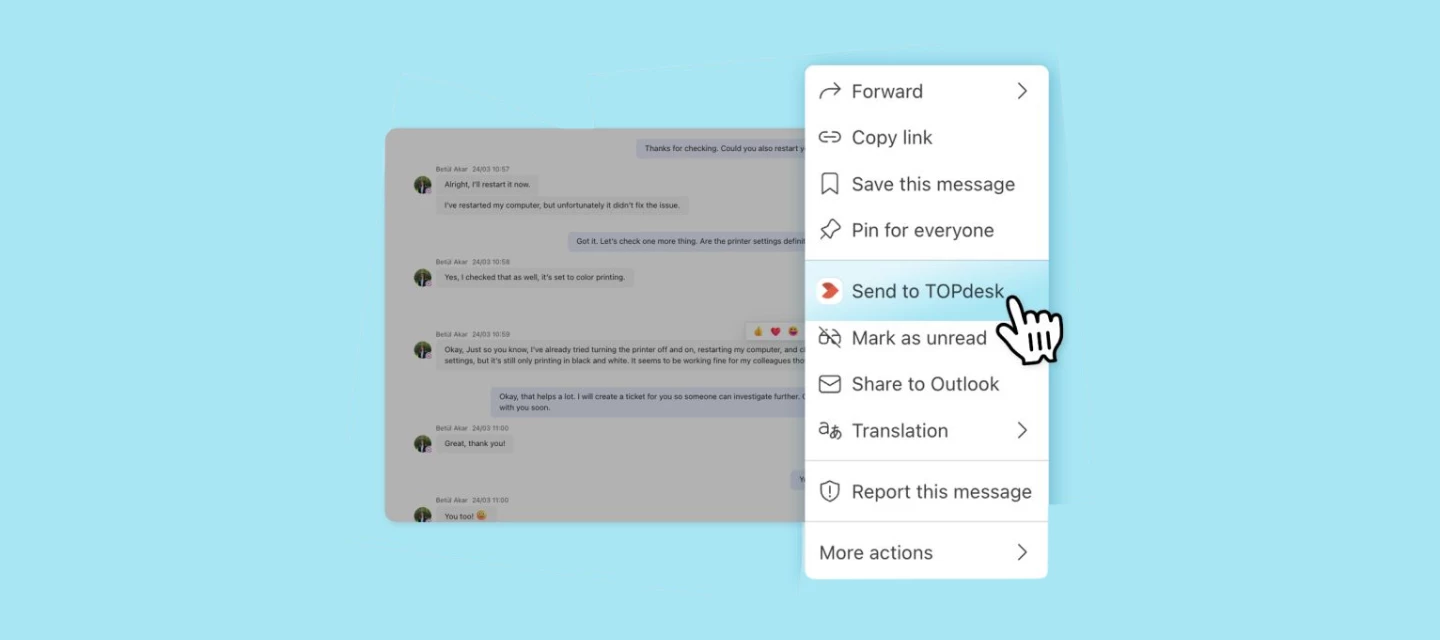
With the Microsoft Teams integration, you can create a TOPdesk incident directly from a Teams conversation without leaving the Teams environment. This ensures that informal chat messages are converted into structured incidents that can be properly tracked and managed in TOPdesk.
 

Add Teams messages to existing calls

In addition to creating new incidents, you can now also add Teams messages to an existing, open TOPdesk call. This means that follow-up information shared in Teams — such as updates from a colleague or additional context from a customer — can be added directly to the right call without switching tools or copy-pasting.
 

What this enables

The Microsoft Teams integration allows you to:

  • Create incidents directly from Microsoft Teams
    Turn a chat message into a TOPdesk incident in just a few steps, without switching between tools.
  • Add messages to existing open calls
    Select a Teams message and add it to an existing TOPdesk call, keeping all relevant context in one place.
  • Work without leaving Teams
    Register and update incidents from the place where the conversation already happens, reducing context switching in your daily work.
  • Preserve conversation context
    Relevant messages are included in the incident, helping operators understand the request from the start.
  • Include attachments from Teams
    Files shared in the conversation can be added to the incident, so all supporting information is available in one place.
  • Link back to TOPdesk from Teams
    Once created, the incident is available via a direct link, making it easy to continue working on it in TOPdesk.
  • Reduce manual work and improve data quality
    By avoiding copy-paste actions, you save time and ensure incident information is complete and consistent.


Together, this leads to a more efficient workflow and better structured data within TOPdesk.

Getting started

The Microsoft Teams integration is now available for all TOPdesk customers.

To start using the integration, you'll need to install the TOPdesk application within Microsoft Teams and connect it to your TOPdesk environment. You can connect using an application token, or via OAuth, which lets an application manager set up the connection once, centrally, for all operators. See the documentation for setup instructions.

Once installed, you can create incidents directly from your Teams conversations, or add messages to existing open calls.

Want to see how it works in practice? In this video, we guide you through both the setup and usage step by step.

For more detailed information about requirements, installation, and usage, you can also refer to the documentation.


Bringing collaboration and service management closer together

By integrating Microsoft Teams with TOPdesk, you can act directly on requests where they are discussed, without recreating information elsewhere. Whether you're logging a new incident or updating an existing call, everything stays connected.

This helps your team work more consistently, respond faster, and keep a complete overview of incoming requests.

If you’ve started using the Microsoft Teams integration, we’d love to hear your experience. How does this integration fit into your current workflow? And where has it helped you save time or improve collaboration?

45 replies

Robin Noppert
Contributor
June 16, 2026

ik vind het heel fijn! het enige waar ik soms tegen aan loop is dat ik maar een gelimiteerd aantal meldingen omhoog/omlaag kan mee laten gaan…. En vind ik het jammer dat ik niet eerst kan selecteren wat het verzoek is en daarna nog een keer kan selecteren wat al mogelijke updates zijn

Ik gebruik het graag! Maar ik denk dat er meer in zit dan dat het doet. 

Translate
Groetjes en een fijne werkdag, Robin
Matt Fuller
Explorer ⭐⭐
June 18, 2026

​@Daniel Macedo worth following this thread for the latest on Teams integration and when it will be able to update existing tickets.


Translate
tverschuur
Contributor
June 18, 2026

Ik was specifiek geïnteresseerd in de vraag of een reguliere behandelaar – dus niet een API-account – met rechten voor de applicatietoken en REST API, ook toegang heeft tot bijvoorbeeld de OData-feed via Excel of Power BI.

Inmiddels heb ik antwoord van Topdesk gekregen:

Met REST-api rechten heb je niet genoeg rechten om toegang te hebben tot de OData feed. Om de OData feed te benaderen, heb je read access nodig op "Advanced reporting data access". Op de docs pagina is dit ook terug te lezen. Dit recht moet dus extra worden aangevinkt indien je wilt dat er ook toegang tot de OData-feed verleend moet worden aan de behandelaars.


Wat mij betreft ben ik gerustgesteld 🙂

Let wel goed op bij het toekennen van REST API-rechten: als je daar niet zorgvuldig mee omgaat, kan een behandelaar meer bevoegdheden krijgen dan wenselijk is. 

Al is dat natuurlijk gewoon de klassieke valkuil: met rechten uitdelen kun je al snel te gul zijn.🙂🙂


Translate
ArjanH
Contributor
June 19, 2026

zo blij met de update dat je nu ook bestaande calls kan bijwerken echt top 

Translate
Functioneel beheerder & AI‑specialist — 80% mens, 20% autocomplete.
June 22, 2026

Ik was specifiek geïnteresseerd in de vraag of een reguliere behandelaar – dus niet een API-account – met rechten voor de applicatietoken en REST API, ook toegang heeft tot bijvoorbeeld de OData-feed via Excel of Power BI.

Inmiddels heb ik antwoord van Topdesk gekregen:

Met REST-api rechten heb je niet genoeg rechten om toegang te hebben tot de OData feed. Om de OData feed te benaderen, heb je read access nodig op "Advanced reporting data access". Op de docs pagina is dit ook terug te lezen. Dit recht moet dus extra worden aangevinkt indien je wilt dat er ook toegang tot de OData-feed verleend moet worden aan de behandelaars.


Wat mij betreft ben ik gerustgesteld 🙂

Let wel goed op bij het toekennen van REST API-rechten: als je daar niet zorgvuldig mee omgaat, kan een behandelaar meer bevoegdheden krijgen dan wenselijk is. 

Al is dat natuurlijk gewoon de klassieke valkuil: met rechten uitdelen kun je al snel te gul zijn.🙂🙂


Ja, dat is lastig in dit verhaal vind ik. Ik wil heel veel van de uitgedeelde rechten niet via de API beschikbaar stellen - maar aan de andere kant de gebruiker wel toegang kunnen geven tot de Microsoft Teams integratie/app om het leven een stukje fijner te maken.

Het liefst zie ik op behandelaarsaccount gewoon de app staan en geef ik de app specifieke toegang, dat doen meer pakketten en is tegenwoordig een soort van “best practice” geworden.

Overigens vind ik het ook jammer dat met ingelogde sessies je altijd met je behandelaarsaccount API endpoints kunt opvragen waar je (lees)rechten voor hebt, bijvoorbeeld /tas/api/incidents. Ik zou liever zien dat dit ook niet meer kan zonder dat API-toegang REST API is aangevinkt.

Translate
New Member ⭐
June 25, 2026

I’m clearly doing something wrong, but I can’t work out what. I’ve created a token and my copy of Teams appears connected, but when I try to add a chat message to TOPdesk I get the error “Unable to reach app. Please try again.” Has anyone seen this before and know what I need to do to correct it?


ha - fixed it! There was a little blue spot in the top corner of my Teams window that I’d not really noticed. I clicked it and it said to “update and restart Teams.” I did that and TOPdesk started working.

Shame the error reporting wasn’t a little more informative (though I think that’s a Microsoft issue not a TOPdesk one)

Hmmmm. I think I am getting the same issue but don’t see any little blue spot.
I reported it to Support but told it’s a Teams issue (very possible).
Anybody any other suggestions?
 

Translate
Sanne van Opstal-Brakel
Employee
Employee
June 30, 2026

Update 30 June 2026: you can now also add Teams messages to existing calls 

We've just released a new addition to the Microsoft Teams integration: you can now add Teams messages to an existing, open TOPdesk call, not just create new ones.

This was one of the most requested features since launch (shoutout to ​@Glenn  and others who articulated the use case so well). The post above has been updated to reflect this new capability.

Give it a try and let us know how it works for you!

Translate
Sanne van Opstal-Brakel, your TOPdesk Community Fairy Godmother
Explorer ⭐
July 2, 2026

I have just set up a number of my Operators with this feature - thank you! It is great. 

However, I have noticed on the “Update Existing Ticket” feature, it does not show any tickets that were created via Teams previously. Is this by design or do I need to amend a permission to display these as well? 

Translate
Sanne van Opstal-Brakel
Employee
Employee
July 2, 2026

No this should be working ​@Caroline Wilmot  just to be sure logg a call with TOPdesk support?
And keep us updated on the result? 

Translate
Sanne van Opstal-Brakel, your TOPdesk Community Fairy Godmother
Explorer ⭐
July 2, 2026

No this should be working ​@Caroline Wilmot  just to be sure logg a call with TOPdesk support?
And keep us updated on the result? 

Sorry Sanne, I think it was user error! 😬 The ticket was in a completed status, so it didn’t show up, but I tired a different ticket in different status’ and it worked 😀 Thanks for replying soo quickly. 

Translate