

Stefan van Opstal
Employee
Employee
June 30, 2026

Meet the new Knowledge Base Explorer
Related products:Knowledge Base
  • June 30, 2026
  • 83 replies
  • 3056 views

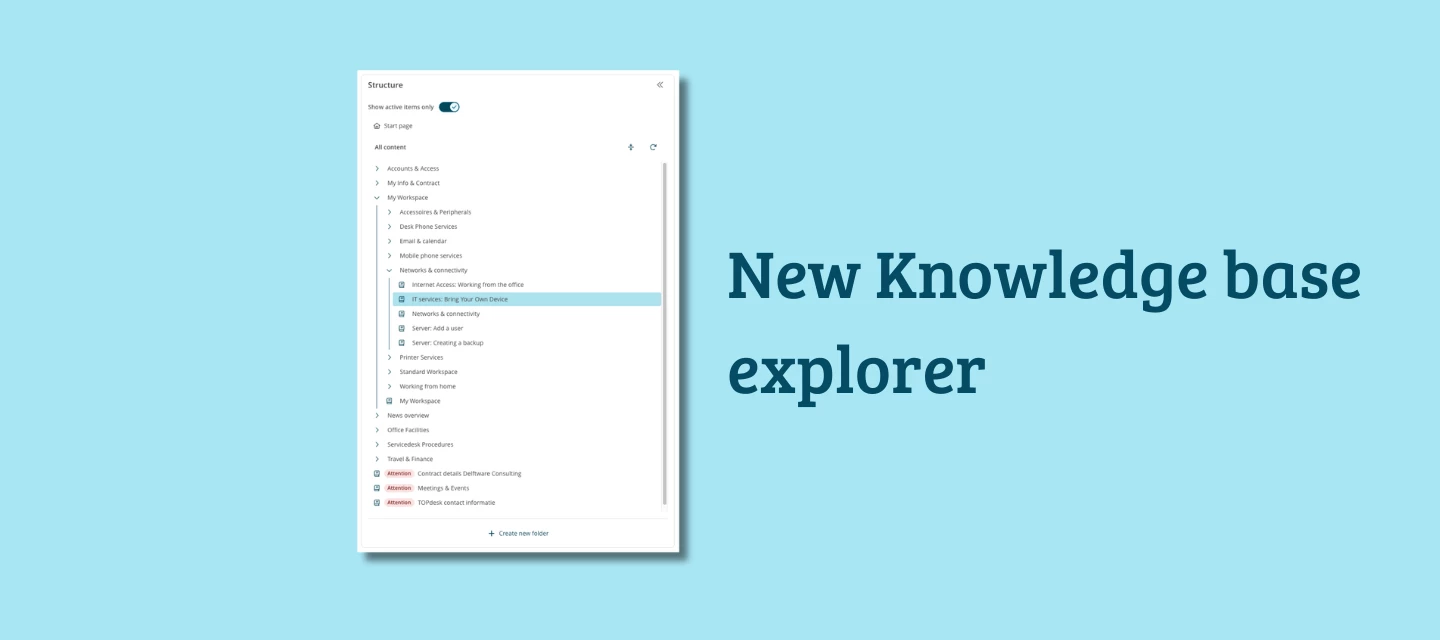
We're releasing a fully redesigned Knowledge Base Explorer.

Whether you're just getting started with knowledge management or you've been maintaining a knowledge base for years, the new Explorer makes it easier to find, organize, and keep your knowledge up to date. And if you're planning to use AI features, this is the foundation they run on.


What's new

Folders

The old workaround of creating empty "parent knowledge items" just to group articles is gone. The new Explorer gives you real folders: create one, add knowledge items beneath it, and set visibility at folder level. Everything inside a hidden folder is hidden in the Self-Service Portal too. Clean, simple, exactly what you'd expect.


Archive filter

Archived knowledge items can now be filtered out of your view. You see only active, current knowledge, no outdated articles mixed in with what's still relevant.


Easier to move items

Moving knowledge items and folders is now much more intuitive. A dedicated interface lets you search or select where to move a folder, including all its subfolders and knowledge items. No more cut-and-paste workarounds.


Clearer translation indicator

The marker that flags a knowledge item as needing translation is now much more visible. A small change, but a useful one for teams working across multiple languages.


Migration

Switching to the new Explorer requires a migration, the folder structure is a meaningful change from how knowledge items were grouped before. You can prepare and run it yourself using the built-in migration guide.

Three steps:

  1. Review what will change after migration
  2. Check for any blocking items
  3. Schedule and confirm the migration

During migration, the Explorer is temporarily unavailable, and knowledge items are read-only. Plan a quiet moment to run it.


More on the way

The new Explorer is the first step. We're actively working on more improvements: a search function within the Explorer, a language selection to browse knowledge items by language, and a more granular permission system at operator and person level. We'll share more details as these reach the roadmap.


Why this matters now

A well-structured knowledge base is no longer just a nice-to-have, it's the foundation for everything AI promises. AI Answer Assistant pulls its suggestions directly from your knowledge base. The better it is, the better the answers your team gets.


Not sure where to start? We're also launching the Knowledge Management Service, where our consultants help you structure your knowledge base and get it AI-ready.

How to get started

The new Knowledge Explorer is available in July for all customers. When released you can read how the migration works and how the structuring of the knowledge in the new explorer works on our documentation portal. 


What do you think?

Have you been struggling to keep your knowledge base organized? We'd love to hear what you've been working around and whether the new Explorer gives you what you were missing. Questions about the migration? Drop them below as soon as you have them. 


83 replies

New Member ⭐⭐⭐⭐
July 2, 2026

Some questions that came to mind after watching the preview video:

  1. Can you create subfolders within folders?

  2. The video shows a "Knowledge manager" at the folder level:
    - what can this be used for?
    - can Knowledge managers be set on Knowledge Items, or only the folder in which they reside?
    - it only shows individuals listed in the Knowledge manager drop down in the video, can teams of people be set as the Knowledge manager? (eg Operator groups/Person groups

  3. The Availability tab only shows options for Self-service portal access (Visible/Not visible/Visible for a certain period) - will there still be an option for making knowledge content available publicly/externally? (Though I note this was the Availability tab for the folder, rather than a KI, so perhaps its still an option on the KI Availability tab?)

  4. Are there any changes to the KI template? Most importantly are there still sections for “Comments for Operators” and “Keywords”?

  5. Can different areas of the Knowledge Base (folders/knowledge items) be permissioned granularly - eg only available to assigned operator groups/permission groups?

Many thanks!

EDIT: Found an answer to question 1 about subfolders from the slides in your What’s New @ TOPdesk – July 2026 webinar:


Sanne van Opstal-Brakel
Employee
July 2, 2026

​@Stefan van Opstal  another question for you 😉

Sanne van Opstal-Brakel, your TOPdesk Community Fairy Godmother
Magne B.
Explorer ⭐⭐
July 2, 2026

I learnt today in the What’s New @ TOPdesk-webinar that knowledge managers (for the folders) will be an operator account. This seems like a bad idea! Currently the “Manager” (which I feel should be called “Owner” rather than “Manager”) for each KI are operator groups rather than individual operators. We do of course not want to assign management/ownership of knowlegde base objects to a single individual who may change role, quit their job, etc.

Stefan van Opstal
Employee
Employee
July 3, 2026

​@Glenn, here are the answers to your questions

  1. Can you create subfolders within folders?

    • You found this already, but yes you can make subfolders. There is no limit to how deep you can go, but of course our advice is not to go too deep.

  2. The video shows a "Knowledge manager" at the folder level:
    - what can this be used for?
    - can Knowledge managers be set on Knowledge Items, or only the folder in which they reside?
    - it only shows individuals listed in the Knowledge manager drop down in the video, can teams of people be set as the Knowledge manager? (eg Operator groups/Person groups

    • ​​​​​​​​​​​​​​​​​​​​​​​​​​​​The manager field has the same purpose as it has on a KI. You can still set the both.

    • It is used to show who owns this part of the knowledge base. Currently it is just an indicator. In the future we want to make sure you can link actions to this field. 

    • With regards to who can be selected, this is both operators and operator groups. Persons and person groups are excluded. KI's will get an author and an owner field in the near future. ​@Magne B. hope this answers your question.

  3. The Availability tab only shows options for Self-service portal access (Visible/Not visible/Visible for a certain period) - will there still be an option for making knowledge content available publicly/externally? (Though I note this was the Availability tab for the folder, rather than a KI, so perhaps its still an option on the KI Availability tab?)​​​​​​​​​​​​​​

    • Indeed the shown settings are for folders. The availability controls for KI's is still the same. We currently do not have a external navigation/portal for folders and KI's (something that we envision for the future), so for now those settings can only be set for individual KI's.

  4. Are there any changes to the KI template? Most importantly are there still sections for “Comments for Operators” and “Keywords”?

    • ​​​​​​​No the setup of a KI is still the same. For folders we chose to only have an description field, as they don't interact with for instance incident cards. 

  5. Can different areas of the Knowledge Base (folders/knowledge items) be permissioned granularly - eg only available to assigned operator groups/permission groups?

    • ​​​​​​​Currently not. We do want to support this in the future. We have build and tested a prototype based on a new permission and filtering system. Although filtering the knowledge base was partially successful, it turned out that is wasn't scalable for the rest of our product. A team is currently researching how this can be made in a way that it is scalable, secure and future proof. 

NickB
Explorer ⭐⭐⭐⭐⭐
July 3, 2026

I learnt today in the What’s New @ TOPdesk-webinar that knowledge managers (for the folders) will be an operator account. This seems like a bad idea! Currently the “Manager” (which I feel should be called “Owner” rather than “Manager”) for each KI are operator groups rather than individual operators. We do of course not want to assign management/ownership of knowlegde base objects to a single individual who may change role, quit their job, etc.


We have the same issue where knowledge owners/managers leave (or change post).
There is no tool to migrate knowledge ownership/management from person A to person B and all anonymised operators all look the same e.g. *************** so it's too late at that point as other knowledge managers who have left share the same name **************** 

equally, knowledge owner/manager x under post y changes roles within the org. It would be nice for a tool to say knowledge owner/manager X with post Y knowledge is now owned by knowledge owner/manager Z

All Round IT Nice Guy + "Guardian of Good Enough"
Stefan van Opstal
Employee
Employee
July 6, 2026

In welke versie kunnen we deze update verwachten?

Sta te springen om de migratie te testen in de test omgeving😎

Hi Sanne,

always glad to hear people are excited to test this out! The exact version is being picked by our release team and this is something that we hope to have available for you before the end of this week. Will update this post as soon as I know the version!

The version for this release is 16.07.004. You can therefor expect the migration banner for the new explorer to show up somewhere between tomorrow and the first few days of next week. 

New Member ⭐⭐⭐⭐
July 10, 2026

In terms of the migration, with the existing structure we have for Knowledge Items, will it just convert that into the new format or structure or will it disrupt the way we have it arranged at the moment?

For example, we have a top level KI or ‘parent KI’ called Office 365 and Collaboration. We then have KIs nested underneath this on MS Word, Teams, Zoom etc

We also have some KIs here that are operator only and some that are available to all users

Once the switchover takes place, does it maintain this existing structure and also availability, or will any of that change?

Stefan van Opstal
Employee
Employee
July 10, 2026

In terms of the migration, with the existing structure we have for Knowledge Items, will it just convert that into the new format or structure or will it disrupt the way we have it arranged at the moment?

For example, we have a top level KI or ‘parent KI’ called Office 365 and Collaboration. We then have KIs nested underneath this on MS Word, Teams, Zoom etc

We also have some KIs here that are operator only and some that are available to all users

Once the switchover takes place, does it maintain this existing structure and also availability, or will any of that change?

Since folders are the new parent item, during the migration the once toplevel KI will be duplicated into a toplevel folder. The original KI will be moved under that folder preserving all information and connected links. The description of the original KI will be used for the description of the folder. Visibility filters will stay in tact and will work the same way as before (of course until in a later time we have introduced filtering for operators, persons and groups of both of them.

It's advised to do the migration first on your test environment to see how long the migration takes and what the result is.

Hope this answers your question. 

Egidio
New Member ⭐⭐⭐⭐
July 10, 2026

Vanochtend zag ik dat in onze testomgeving de migratieopties voor de nieuwe kennisbank verkenner beschikbaar waren. Ik heb de migratie direct uitgevoerd.

Van de ongeveer 520 kennisitems waren er slechts twee waarbij een probleem werd geconstateerd. Nadat deze waren opgelost, kon de migratie worden gestart.

Na de herstart van de testomgeving begon het migratieproces. Mijn geduld wordt echter behoorlijk op de proef gesteld, want na twee uur staat de voortgang nog steeds op 0% gemigreerd... 😅


Stefan van Opstal
Employee
Employee
July 10, 2026

​@Egidio We are looking into it. During the beta test we have seen cases where it took longer, but just to be sure we will dive into your case. Will update this reply when I know more. 

-- UPDATE --

Something indeed is going wrong. Not so much due to the migration but in a database configuration of public knowledge articles that, probably during a reseed, got mixed up. Our SaaS support is now looking into it. After they have fixed it the migration should continue. 

Rest assured that for your production environment this issue will not happen.