
New Member ⭐⭐⭐
October 9, 2026
Solved

Automatic Assignment – excluding certain operators and more flexible assignment limits

Anyone using TOPdesk Automatic Assignment in a larger teams?

We’re looking at using the Automatically assign calls to operators feature, but I’ve come across two limitations I’d be interested in hearing how others have handled.

1️⃣ Excluding certain operators

Our Team Leads need to remain members of the operator group, but we don't necessarily want them included in the automatic assignment pool.

Has anyone found a way to keep someone in the group while excluding them from auto-assignment?

2️⃣ Configurable assignment limits

TOPdesk currently allows the assignment limit to be changed through a drop-down. 

It would be great if this could instead be an editable/configurable number, giving teams more control over workload thresholds.

Interested to know how others are using this in practice. Have you found a workaround, alternative configuration or automation that achieves either of these?

dionf
dionfAnswer
Employee
October 12, 2026

Hi mahmed,

Thanks for the detail. With around 120 operator groups, creating a second assignment group for each team doesn’t sound manageable. And since your Team Leads need to receive calls occasionally, unticking their First Line Call Operator task isn’t suitable either.

The Plan Board and Kanban Board can be useful alongside Automatic Assignment. They give Team Leads a view of the work and a way to reassign or pick up calls when needed. They don’t, however, control which group members take part in the automatic rotation.

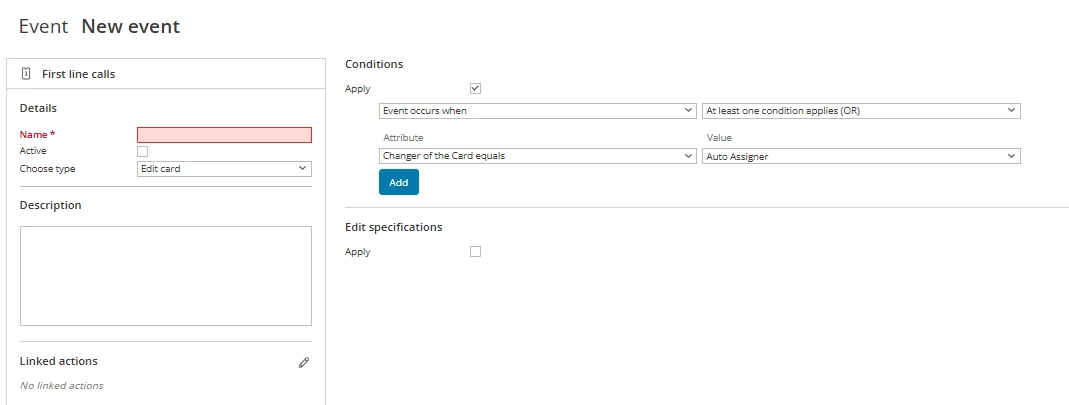
One possible workaround to test is an action sequence that detects when a call has been automatically assigned to a Team Lead and returns it to the operator group. An attention on the Team Lead’s operator card could identify who should be excluded. The part I haven’t verified is whether the automatic assignment can reliably be identified as the change that triggered the action. but this might be the trigger: 


For a lasting solution, I’d suggest a request on TIP: an option on each operator card to opt in or out of Automatic Assignment, while retaining group membership and manual assignability. Your example across 120 groups makes the need very clear. I’d submit the freely configurable assignment limit as a separate request so both improvements can be considered on their own.

4 replies

dionf
Employee
Employee
October 12, 2026

Hi mahmed,

For your first point, one option is to keep the Team Leads in the operator group but untick ( for example First Line Call Operator ) under Tasks on their individual operator cards. They can retain the permissions they need, while they will no longer be available as first-line call operators for assignment. The trade-off is that this also prevents you from manually assigning a first-line call to them.

If Team Leads do need to take calls occasionally, I would consider a separate operator group for the automatic assignment pool, containing only the colleagues who should receive calls. The Team Leads can remain in the broader team group. You would then need to route incoming calls to the pool group. with the new task board they can easily select the other operator groups they manage without beeing a part of them. 

For the limit: the current Automatic Assignment setting uses a drop-down on the operator group card. you can also use action sequences to route calls to the appropriate operator group based on information such as the caller’s branch or a linked asset. That can help get a call to the right team, but it is a separate step from distributing calls among operators or setting their workload limit.

🚓 KI 12565 - [INC] Assign operator group based upon branch of the caller
🚓 KI 14267 - [INC] Assign operator group based upon linked asset
🚓 KI 12567 - [INC] Assign operator group based on branch of linked asset

Do your Team Leads need to be available for occasional manual assignment, or should they never be assigned to calls? That would determine which of the two group setups is more practical.

Translate
mahmedAuthor
New Member ⭐⭐⭐
October 12, 2026

Hi Dionf,

Thanks, that makes sense.

Our Team Leads/Managers do occasionally action tickets when requested by their team, so we wouldn’t want to completely remove their ability to be manually assigned a ticket.

Their primary role, however, isn’t to sit within the normal first-line workload. They need visibility of the live tickets so they can oversee the team, spot trends or recurring issues, support colleagues, and step in where required, without normally receiving tickets through automatic assignment.

The challenge we have with the separate operator group approach is scale. We currently have around 120 operator groups, so creating and maintaining separate automatic-assignment groups alongside these doesn’t feel particularly manageable long term.

We also already have automations in place that look at information such as the site and category to determine which operator group a ticket should be routed to. Once it reaches that operator group, there may be a number of staff within the group who could potentially receive the ticket.

Ideally, what we’re looking for is a way to keep that existing routing structure, but then control which individual operators within the group participate in automatic assignment, while still allowing Team Leads/Managers to:

  • remain members of the operator group;
  • see and monitor the live workload;
  • manually pick up or be assigned tickets when required; and
  • be excluded from the normal automatic assignment rotation.

Is there currently a way to achieve that without needing to create separate operator groups for the automatic assignment pools?

Thanks again, the information you’ve provided has been really helpful.

Translate
dionf
Employee
dionfAnswer
Employee
October 12, 2026

Hi mahmed,

Thanks for the detail. With around 120 operator groups, creating a second assignment group for each team doesn’t sound manageable. And since your Team Leads need to receive calls occasionally, unticking their First Line Call Operator task isn’t suitable either.

The Plan Board and Kanban Board can be useful alongside Automatic Assignment. They give Team Leads a view of the work and a way to reassign or pick up calls when needed. They don’t, however, control which group members take part in the automatic rotation.

One possible workaround to test is an action sequence that detects when a call has been automatically assigned to a Team Lead and returns it to the operator group. An attention on the Team Lead’s operator card could identify who should be excluded. The part I haven’t verified is whether the automatic assignment can reliably be identified as the change that triggered the action. but this might be the trigger: 


For a lasting solution, I’d suggest a request on TIP: an option on each operator card to opt in or out of Automatic Assignment, while retaining group membership and manual assignability. Your example across 120 groups makes the need very clear. I’d submit the freely configurable assignment limit as a separate request so both improvements can be considered on their own.

Translate
mahmedAuthor
New Member ⭐⭐⭐
October 13, 2026

Hi Dionf,

Thanks for the quick response and for suggesting a workaround.

This definitely looks like something that could work for us, so I’ll give it a test and see how it behaves in practice, particularly around detecting when Automatic Assignment has assigned the call to a Team Lead.

Much appreciated. I’ll post my findings once I’ve had a chance to test it and will also submit the request on TIP for the longer-term solution.

Thanks again!

Mahmed

Translate