Solved

Optional fields

  • July 21, 2026
  • 6 replies
  • 56 views

Forum|alt.badge.img+2

Optional fields.

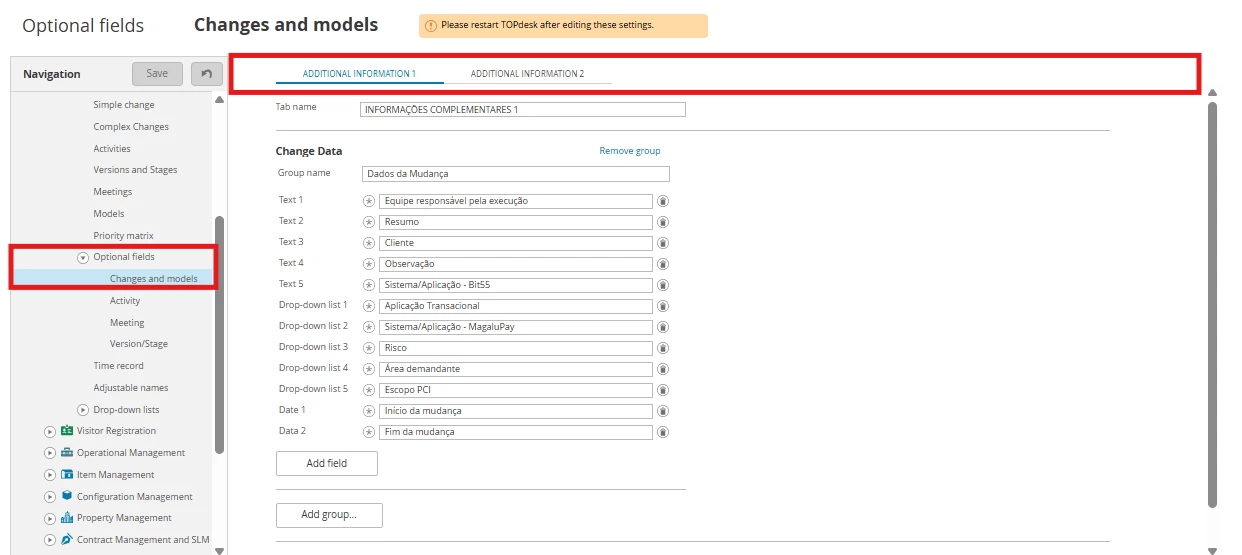
How can we handle situations where a TOPdesk client is large, with multiple departments, and their custom configurations exceed the number of optional fields TOPdesk provides for the Change and Incident modules?
The standard limit is just ten fields per type (text, date, drop-down list, etc.).
Increasing this would be a major benefit for all clients and a significant advantage over ITSM competitors.
At the very least, adding three more optional field tabs—bringing the total to five—would help. The current limitation is drawing negative feedback from teams.


Best answer by Joost Oostindie

Glad to help!

Sadly it's not possible to display those fields on an SSP form to fill the asset data.
Your best option would then probably be to have an automatic action create the asset upon creation of the change.

From there you have 2 options to fill the asset data, automated or manually.

  • Automated:
    Based on the data that's in the request field of the change, you could try to automatically fill some fields on the asset.
    This might prove a little bit difficult, since you need to get it out of the plain or memo text from your change request, but could be doable if the SSP form does not change too much in a short period of time and the questions and structure remains the same.
    You would have to make use of the ?keep_before and ?keep_after built-ins in your json body to get the correct data and then post it to the required asset field.
  • Manually:
    If you want to start out easier, you could also have the asset created automatically, but have an operator fill in the required fields by hand, based on the information presented in the change request.
    You could link the asset as a separate tab on the change form, to make it easily accessible for the operator.
    This is much like the extended impact analysis functionality that TOPdesk offers:
    Extended Impact Analysis for Change Requests - My TOPdesk SSP

I understand it can sometimes be difficult to come up with the right configurations, especially when you need an out of the box solution. A lot of those are based on experience and available knowledge I think.
Though there is maybe not a video demonstration for everything, TOPdesk does offer a wide variety of knowledge items on my.topdesk.com that contain a lot of creative solution or action sequences that can be tweaked to your need. And aside from that, there is always the Community of course.

Hopefully you can find a suitable way of working this way. If you have any more questions, feel free to reach out!

 

6 replies

Joost Oostindie
Forum|alt.badge.img+9

Hi ​@Deucimar Firmino,

Currently, this is not possible.
If you would want to expand on these optional fields, you can suggest this via tip.topdesk.com.

As a solution for now, I would recommend you to look into different ways to register the information you need. It's always best to try to make use of the available fields as much as possible. 

If you're really looking for this much added functionalities, the Asset Management module is probably the best way to go.
You could consider creating an asset template for these custom configurations and to document them per customer/department for example.

By documenting this in the asset, and adding the Location or Department to the relation widget, the information is still quite easy to find by opening this from the caller block and looking into the asset tab.

Hope this helps you forward!


Forum|alt.badge.img+2

Thank you very much, Joost Oostindie.

I received this suggestion from TOPdesk support as well: linking an asset template to the change module.
It would be ideal if TOPdesk offered video demonstrations of these configurations, as the need for paid consultancy services often arises depending on the client's level of expertise.
I will review the details and run some tests.

Regarding this workaround, would it be possible to display the asset template fields on the form so that the requester can enter the necessary data?

I have submitted this request to tip.topdesk.com, as this is a crucial issue for our company—we want to avoid the risk of looking into competing ITSM tools.

Thanks again.


Joost Oostindie
Forum|alt.badge.img+9

Glad to help!

Sadly it's not possible to display those fields on an SSP form to fill the asset data.
Your best option would then probably be to have an automatic action create the asset upon creation of the change.

From there you have 2 options to fill the asset data, automated or manually.

  • Automated:
    Based on the data that's in the request field of the change, you could try to automatically fill some fields on the asset.
    This might prove a little bit difficult, since you need to get it out of the plain or memo text from your change request, but could be doable if the SSP form does not change too much in a short period of time and the questions and structure remains the same.
    You would have to make use of the ?keep_before and ?keep_after built-ins in your json body to get the correct data and then post it to the required asset field.
  • Manually:
    If you want to start out easier, you could also have the asset created automatically, but have an operator fill in the required fields by hand, based on the information presented in the change request.
    You could link the asset as a separate tab on the change form, to make it easily accessible for the operator.
    This is much like the extended impact analysis functionality that TOPdesk offers:
    Extended Impact Analysis for Change Requests - My TOPdesk SSP

I understand it can sometimes be difficult to come up with the right configurations, especially when you need an out of the box solution. A lot of those are based on experience and available knowledge I think.
Though there is maybe not a video demonstration for everything, TOPdesk does offer a wide variety of knowledge items on my.topdesk.com that contain a lot of creative solution or action sequences that can be tweaked to your need. And aside from that, there is always the Community of course.

Hopefully you can find a suitable way of working this way. If you have any more questions, feel free to reach out!


Emerson Pedro Gonçalves
Forum|alt.badge.img+2

It is possible to work around this limitation by leveraging the Asset Management module. You can create an asset type containing all the custom fields required for your specific use case.

Then, within the Incident Management module, create an HTTP action using the GET method and point it to the asset using the URL:

/tas/secure/assetmgmt/card.html?unid=[ASSET_ID-]

Make sure to enable the "Display URL in additional tab" option.

To automate the process, create an Action Sequence that, whenever an incident is created, also creates an asset of the previously defined asset type and stores that asset's ID in a field on the incident. This way, every incident will have its own linked asset containing all the additional custom fields required by the process.

An additional advantage of this approach is that it allows you to create virtually fully customizable and secure tabs by leveraging the native Asset Management permission model. Just make sure that users have the necessary permissions to view and edit the associated assets.

Another benefit is that only a single HTTP action is required. Whenever an incident has an asset of this type linked to it, the additional tab will automatically open the corresponding asset using the stored ID. If no asset is associated with the incident, the additional tab will simply display no information.

In my opinion, this is currently the best alternative for creating something very close to a fully custom tab in TOPdesk while significantly extending the amount of information that can be stored alongside an incident without relying on the native optional fields. Furthermore, the solution can be reused across different business scenarios by simply creating new asset types with structures tailored to each specific requirement.


Forum|alt.badge.img+2

Hi Emerson,

Thanks a lot for the information.

I’ll need to take some time to carefully analyze how to configure this. Ideally, TOPdesk would provide a more detailed step-by-step guide—at least with screenshots, or better yet, videos—in the knowledge base.
Our goal is for these fields to be available on the forms within the Incident and Change modules following this integration/automation. In other words, we want to create distinct assets linked to both modules so that the requester can enter all the necessary data directly into the form, eliminating the need for an operator to do so manually after the incident or change request has already been logged.
Essentially, the Asset and its fields would need to appear on the form. However, from what I gather so far, that doesn't seem to be possible.

Thanks again.


Emerson Pedro Gonçalves
Forum|alt.badge.img+2

In this case, you could use Action Sequences to copy the values from the request fields and populate either the optional fields or the fields in the asset tab mentioned earlier.

There is a previous response from Joost Oostindie where he mentions the ?keep_after and ?keep_before parameters and references knowledge articles related to implementing additional tabs using assets.

Essentially, what needs to be done is to configure an Action Sequence that extracts the information from the card's request field and makes an API request back to TOPdesk itself to update either the optional fields or the asset-based tab.

You can refer to this knowledge article for implementation details:

Knowledge Article - Additional Tabs Using Assets

Or browse the knowledge library for additional related content:

TOPdesk Knowledge Library