Best answer by Joost Oostindie

Reading this now, right after I posted my answer below!
To follow up on this:

You can use closure codes when ‘completing’ and incident.
So if you use the following settings for call management:
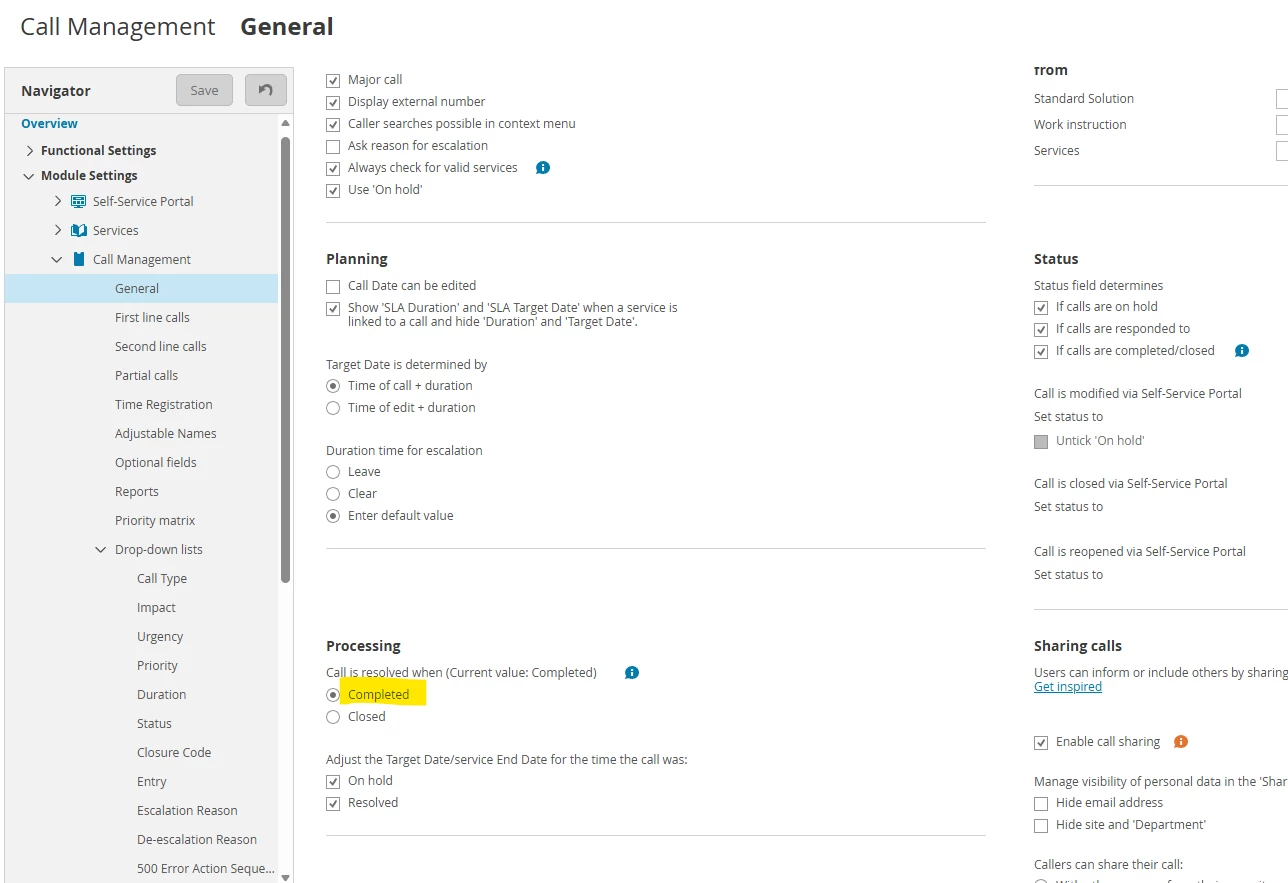


And then respectively put the settings for 1st and 2nd line calls like this:
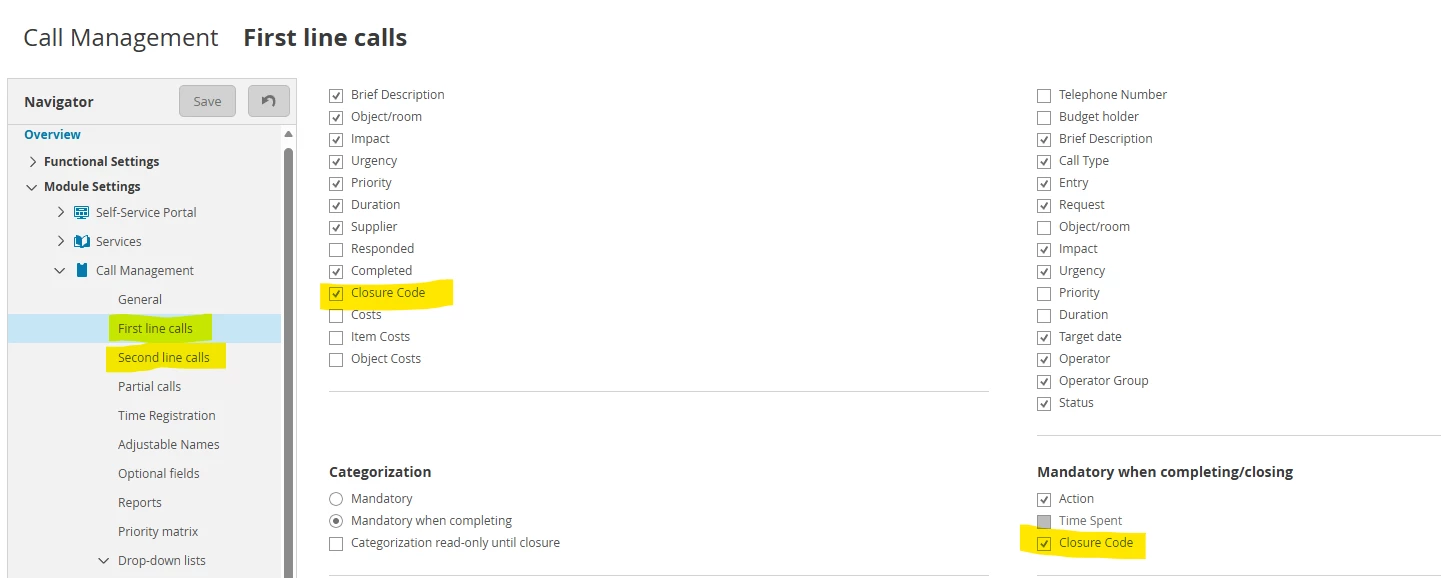


You can have the closure code filled in when the incident is put on ‘completed’ by the operator.
The incident will still be automatically closed after this, following the workflow/action sequence I mentioned below.

If this is not how it works for you and the process is different, please let me know, so we can try to find another solution!

5 replies

KevinStouthandel
Explorer ⭐⭐⭐
September 4, 2026

Hi,


Before going into the solution, what is it you want to achieve? What is the request behind the request? 😁

Groeten, Kind regards, Kevin Stouthandel
Explorer ⭐
September 4, 2026

We would like to record what the actual issue was about when closing the call. 

Example: a call may originally get raised as a Software(Cat) > Fault (Sub-Cat), but on talking to the user and getting to the bottom of the issue, it is actually User Fault. We would like to record this as User fault using the Closure Codes. At the moment, as we have auto closure on tickets, we were told the closure codes can’t be used. So we would report on this ticket as a Software Fault. Sometime an operator may update the Cat / Sub Cat, but we are very bust and I know they don’t, so my reporting is skewed. 

Joost Oostindie
Contributor
September 4, 2026

Reading this now, right after I posted my answer below!
To follow up on this:

You can use closure codes when ‘completing’ and incident.
So if you use the following settings for call management:


And then respectively put the settings for 1st and 2nd line calls like this:


You can have the closure code filled in when the incident is put on ‘completed’ by the operator.
The incident will still be automatically closed after this, following the workflow/action sequence I mentioned below.

If this is not how it works for you and the process is different, please let me know, so we can try to find another solution!

Joost mag het weten, jij ook!
Joost Oostindie
Contributor
September 4, 2026

Hi ​@Caroline Wilmot,

It is possible to use call closure codes. You can define these yourself in the Call/Incident Management module:


Aside from that it also possible to auto close incidents, but it depends on when/how you want to do this to decide if this works well combined with Closure Codes.

The most standard implementation for auto closure is to have calls/incident put on the ‘completed’ status by the operator. This would also be the moment to have the Closure Code filled by the operator.
Afterwards the incident can automatically be closed after (for example) 7 days, so a caller has the opportunity to re-open the incident if necessary.

If this is what you're looking for you can find the corresponding action sequence as attachment.
(There's also a good chance it's already available in your TOPdesk environment, since TOPdesk delivers new environments including some basic action sequences like this one.)

If this isn't what you're looking for, I'm going to ask the same as ​@KevinStouthandel. Please let us know if you're trying to achieve something else!

Joost mag het weten, jij ook!
Explorer ⭐
September 4, 2026

Thank you Joost, this is exactly how we have our system set up. We had never implemented Call Closure Codes as our Topdesk trainer said it would not work! :-(

I will get this created and we can start using these codes :-)
