


New updates for the New Self-Service Portal
We're releasing the new Self-Service Portal (SSP) in smaller, faster parts on purpose, so you get new functionality sooner rather than waiting for one big release. This update brings three changes that make approving work and submitting requests smoother for everyone involved. As always, switching to the new SSP is optional and reversible, so you can move at your own pace.
Approval of change activities in the new SSP
We made several improvements to the approval process for managers in the new Self-Service Portal (SSP). Change activities are now fully accessible, responsive, and use the new TOPdesk look and feel. With this we unified the experience for approving changes and change activities, so managers no longer have to switch between different looks and flows depending on what they're approving. Because the page is now responsive, approving a change activity works just as well from a phone or tablet as it does from a desktop, so a manager can review and approve while on the go, without waiting to get back to their desk.
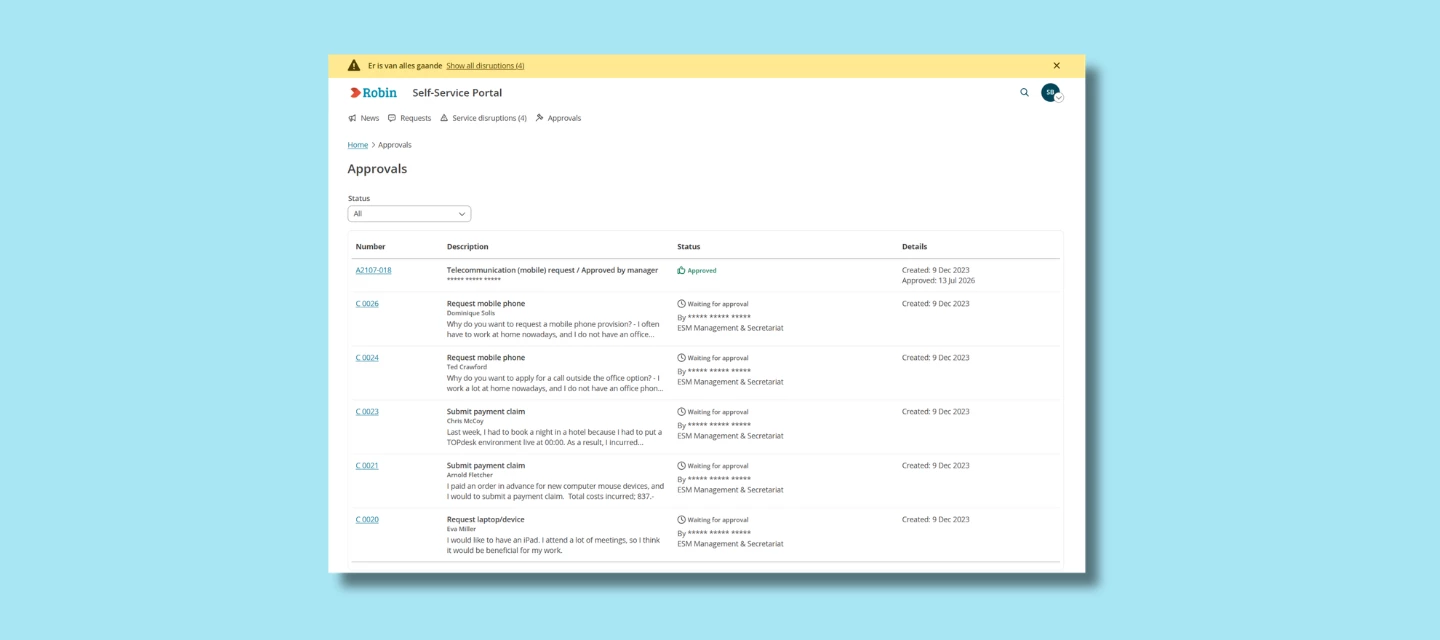
Approval overview in the new SSP
We made several improvements to the Approval overview for managers in the new SSP. The page is now fully accessible, responsive, and uses the new TOPdesk look and feel. This gives managers a single, up-to-date place to see everything waiting for their approval, changes and change activities alike, instead of having to check multiple places to know what still needs their attention. See our documentation for a complete overview of the available functionality and navigation options.
Share requests while filling out a form
You can now share a request with others directly while filling out a form in the new Self-Service Portal. This is useful when you want a second pair of eyes before submitting, for example asking a colleague to double-check the details of a purchase request, or looping in a manager who needs to be aware of a request before it's sent. No more copying details into an email or chat message first; you can share the request straight from the form you're already filling out.